📣 Our MCP server is now available to ALL paying customers, enabling you to connect PlantPredict to your favorite AI tools like Claude. Learn more →
✕

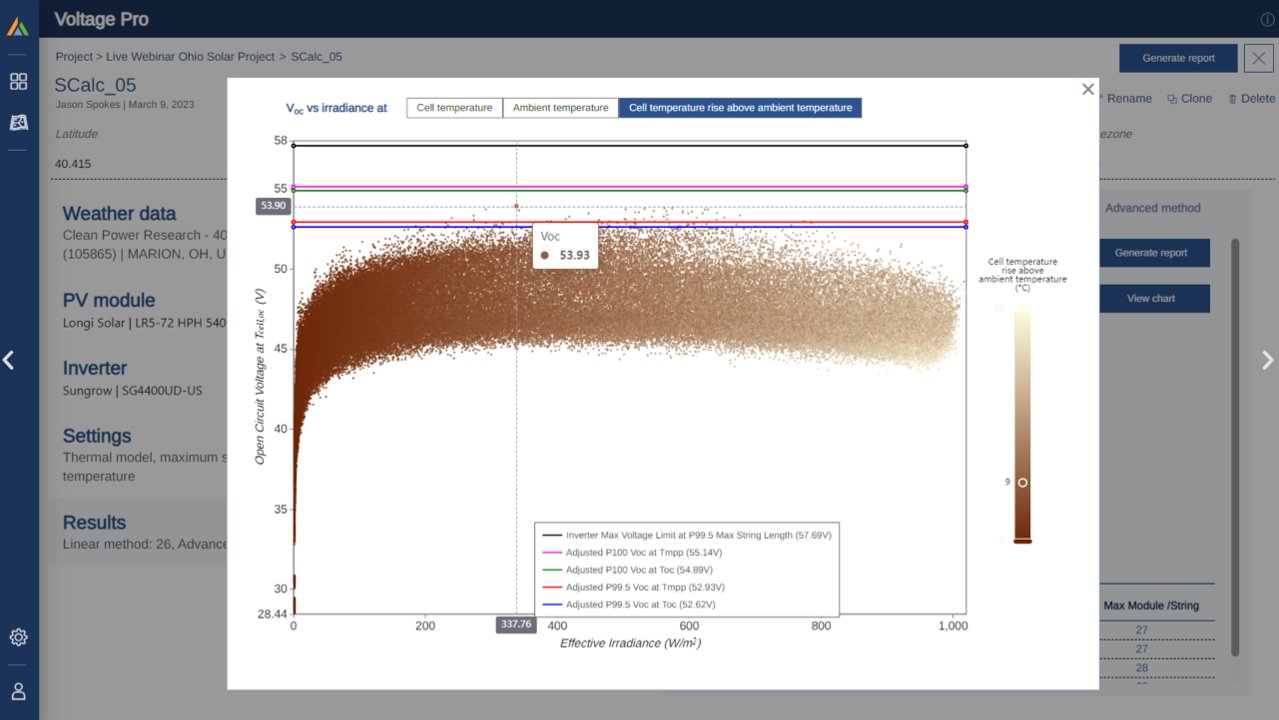
Accurate string size calculation is essential in PV system design to ensure string voltages stay within safe limits across all environmental conditions. Traditionally, designers have relied on simplified formulas which often prove to be overly conservative. Voltage Pro offers a modern alternative by simulating string voltages through advanced modeling that integrates historical weather data, module characteristics, and thermal behavior. This data-driven method delivers more accurate and optimized string sizing.
In PlantPredict's Voltage Pro, there are two distinct methods available to calculate string size:
Each method has its own use case, depending on the project's complexity, risk tolerance, and regulatory requirements.
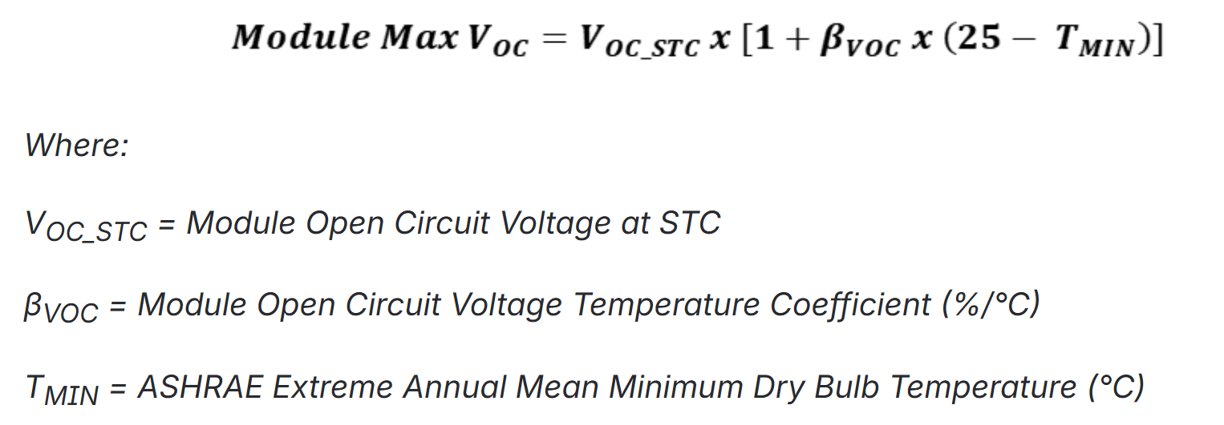
The Simplified Linear Approximation employs a traditional formula that has been fundamental in the PV industry for many years. It calculates the maximum string size based on the module's open-circuit voltage (Voc) and temperature characteristics (specifically the ASHRAE Extreme Annual Mean Minimum Dry Bulb Temperature).
This method is conservative because it utilizes both historical extreme low temperatures and module voltage characteristics at standard test conditions, which typically do not occur simultaneously, as historical low temperatures usually occur at night. It also assumes that the cell temperature is equal to the ambient temperature, even though cells are usually warmer when exposed to sunlight.
The advanced simulation method in Voltage Pro utilizes the PlantPredict module model to estimate the open-circuit voltage (Voc) for each solar module and string during energy predictions. This calculation takes place at every timestep, relying on detailed weather and irradiance data. For the most accurate results, it's best to use long-term, hourly weather data (spanning about 20 years). This approach helps capture extreme weather events that might not show up in just one year of data, giving you a more dependable view of system performance over time.
Additionally, the calculation incorporates a thermal model to estimate the relative difference between ambient and cell temperature, since temperature has a significant impact on Voc. There are two thermal models to choose from: the default Heat Balance model (which is also used in PVsyst) and the Sandia model. Both models consider how heat is absorbed and released by the module, influenced by factors like mounting height and airflow.
Furthermore, Voltage Pro calculates Voc at two different temperatures — one under steady-state operating conditions (MPP) and another under steady-state open-circuit conditions (OC). It then provides both P100 and P99.5 Voc values, with P99.5 being recommended as the best basis for string sizing according to IEEE research.
If you are interested in learning more about the advanced simulation method, check out the Voltage Pro Documentation.
The Linear Method and Advanced Method comply with the following codes and standards, based on consultation with industry stakeholders and a review of available research by Terabase:
Below are three ways in which Voltage Pro is integrated with PlantPredict:
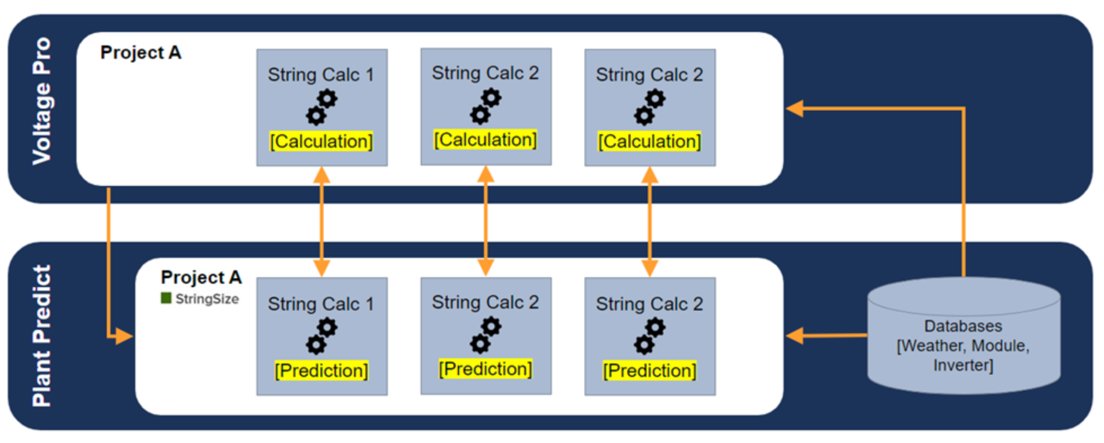
You can access Voltage Pro from either PlantPredict or from Terabase Apps.

Once you open Voltage Pro, click on the Create Project button located in the top-right corner of your screen.

Enter the Name, Latitude, and Longitude for the project. The fields for Locality, State, Country, Elevation, and Timezone will auto-populate. After that, click Save.

The project setup is now complete. Click the Add a string calculation button in the bottom right corner to start entering project inputs.

There are five input categories needed for String Size Calculation: Weather Data, PV Module, Module Mounting, Inverter, and Settings. Let's look at each category below.
On the String Size Calculation tab, click the Update button next to Weather Data. This will open three tabs on your right where you can view and update the following:


Module data is crucial for calculating string sizes, and Voltage Pro makes accessing this data easier through its integration with the PlantPredict Module Library. Users can select and save PV module data files, and view important module details in the input panel. If you would like to add additional modules, click the "Upload a Custom PV Module" button. This will redirect you to the PlantPredict module library, where you can add your custom PV module and access it in Voltage Pro as well.
The mounting type (and orientation) affects the temperature of the module, which in turn influences the voltage output and determines the maximum number of modules that can be safely connected in a string. In this section, you can choose either a Single Axis Tracker or Fixed Tilt. If you select Single Axis Tracker, you will also need to provide the Module Azimuth. If you choose Fixed Tilt, you will need to supply both the Module Azimuth and the Module Tilt.

Inverter data in Voltage Pro is used to set the maximum DC system voltage (modifiable in Settings). You can select inverter files from the PlantPredict library, upload a custom inverter, and view key inverter details. Different inverter input parameters are utilized in both string size calculation methods.

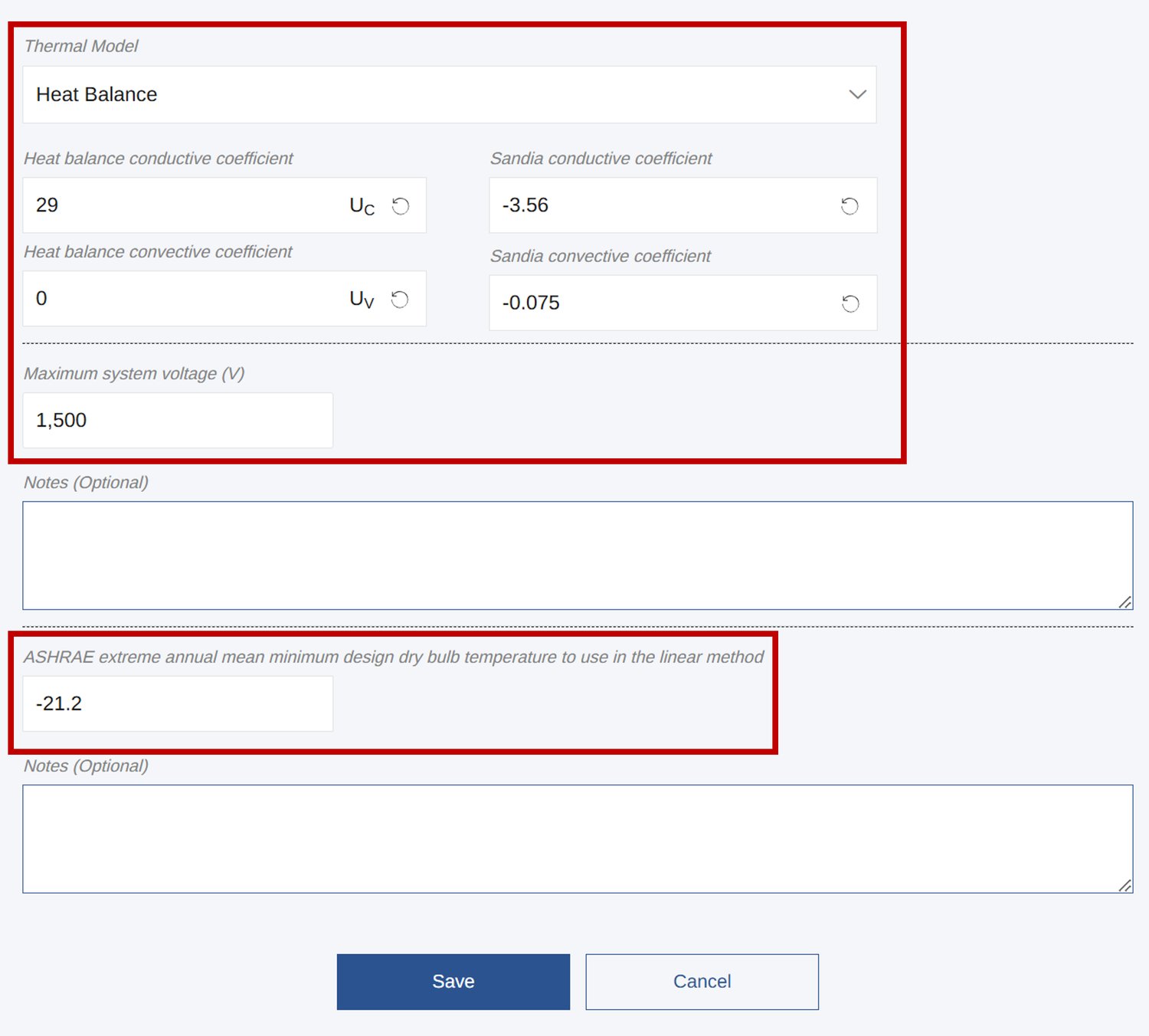
You can customize the calculation settings in Voltage Pro to enhance Method 2 simulations. You have the option to choose between the Heat Balance or Sandia Thermal Models, adjust the conductive and convective coefficients, and override the default maximum inverter voltage to better reflect system limits or introduce a margin of safety. Additionally, you can manually update the default ASHRAE extreme annual mean minimum dry bulb temperature based on data from the nearest weather station.
After providing all the required inputs, you will receive the string size calculation results for the Linear Method, which is 26 for this simulation. Click on Run Analysis to obtain the results for the Advanced Method.

You will see that the Advanced Method yields a string size calculation of 28. You can also choose to generate a report, which will provide you with compliance information, site info, inputs, calculations, and charts.

Click on the Linear Method tab to view the results of string size calculation using the Simplified Linear Method.
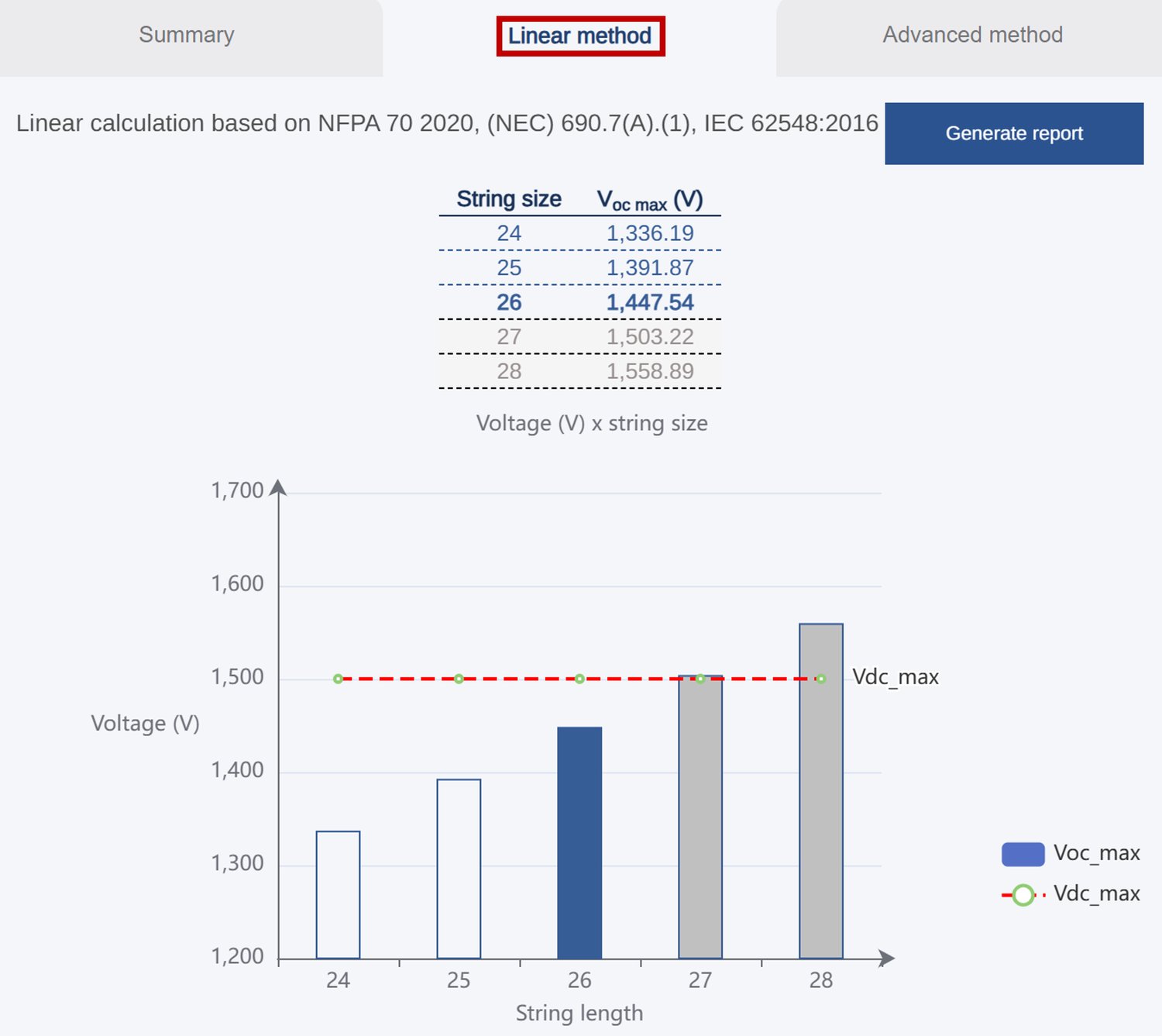
To view the results of the string size calculation using the Advanced Simulation Method, click on the Advanced Method tab. You can also update the inputs for various safety factors, which will adjust the string size calculation accordingly.

Additionally, you can access the chart for the following:
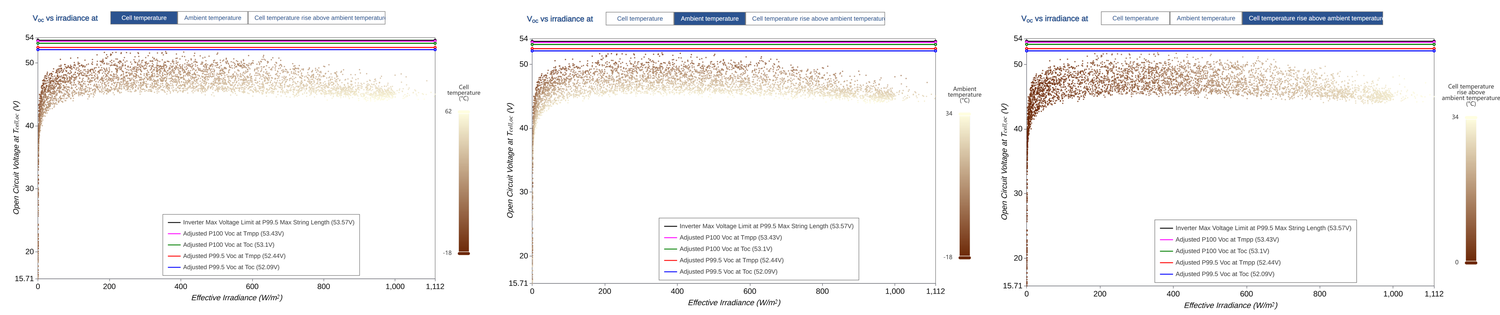
By integrating advanced string sizing algorithms into PlantPredict, engineers, EPCs, and developers can make smarter decisions with measurable outcomes. Below are the six major benefits of Voltage Pro:

Voltage Pro streamlines string sizing by combining real-time thermal modeling with advanced voltage analysis, making the process faster and more accurate. Its seamless integration with PlantPredict ensures that every design aligns with real-world conditions and adheres to best-practice standards. Try Voltage Pro to simplify your workflow and design solar systems with greater precision.
Join hundreds of organizations that trust PlantPredict for bankable energy predictions. Start with a free account, get a free trial of Pro features, or book a demo with our team.