📣 Our MCP server is now available to ALL paying customers, enabling you to connect PlantPredict to your favorite AI tools like Claude. Learn more →
✕

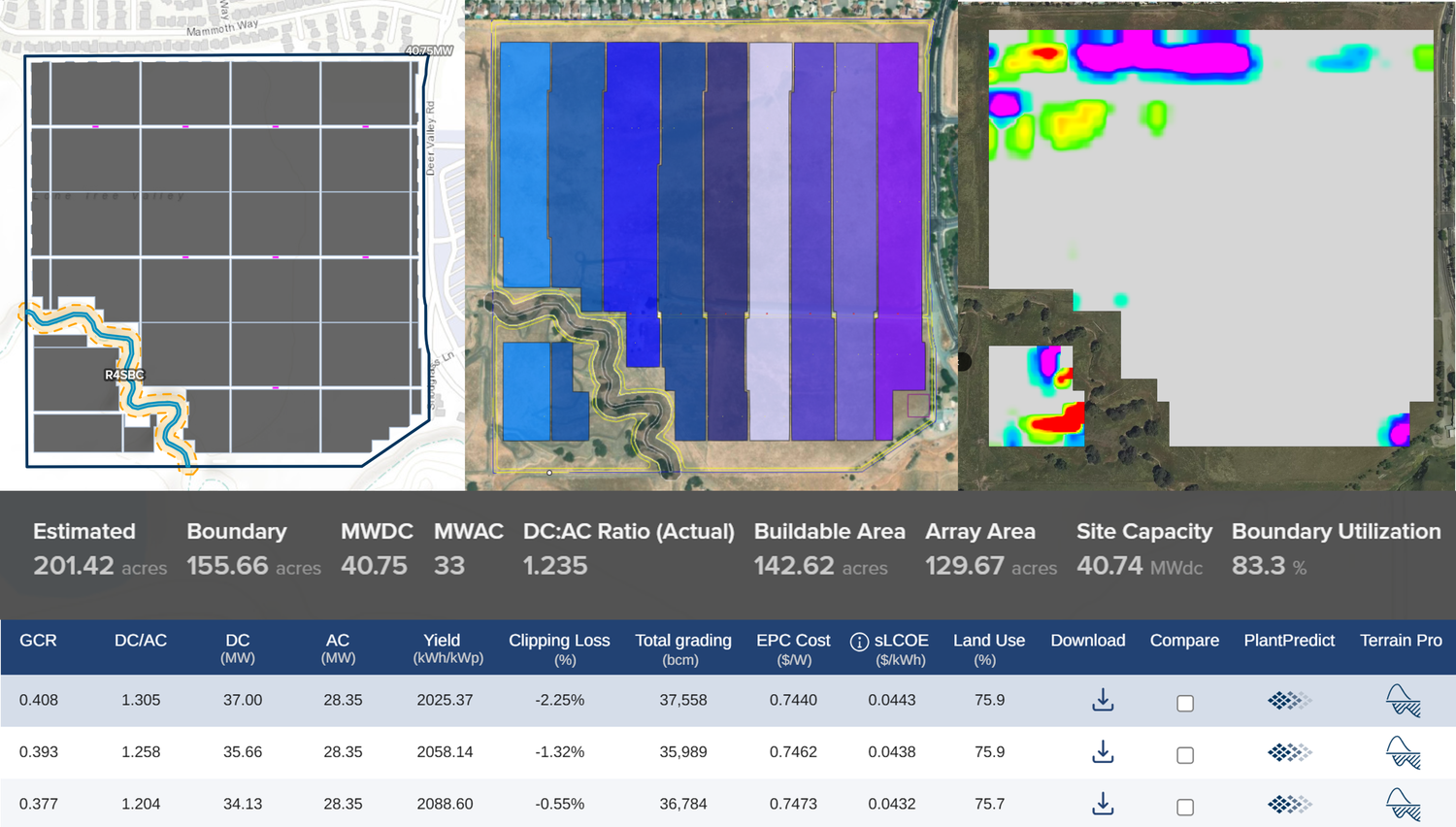
In utility-scale solar development, efficiency isn't just an advantage, it's absolutely essential. From concept to commissioning, teams are juggling intricate designs, changing data, and tight timelines, all while ensuring everything is accurate and financially viable. Yet many software tools in this industry are either too fragmented or overly complicated, creating more obstacles than removing them.
That's where PlantPredict comes in handy. Designed specifically for professionals in utility-scale solar, it merges robust modeling features with a user-friendly, cloud-based platform that fosters collaboration, speed, and confidence. Whether you're an engineer, analyst, or developer, PlantPredict simplifies the process of predicting performance, optimizing designs, and turning solar projects into reality.

PlantPredict's modern user interface is designed for speed, clarity, and minimal onboarding friction. Unlike complex desktop-based tools, PlantPredict's interface is not just clean, it's modular and built for utility-scale solar workflows.
Whether you're a seasoned engineer optimizing DC/AC ratios or a student intern exploring terrain constraints, it's easy to adapt to the PlantPredict UI without overwhelming yourself. Inputs are logically grouped, tooltips are context-aware, and simulations provide immediate visual feedback. This means new users can go from login to layout optimization in hours, not weeks.
The result is faster project cycles, fewer training bottlenecks, and more time spent on engineering rather than software troubleshooting. Let's take a look at the User Interfaces of PlantPredict, Design Pro, Terrain Pro, and Voltage Pro below.
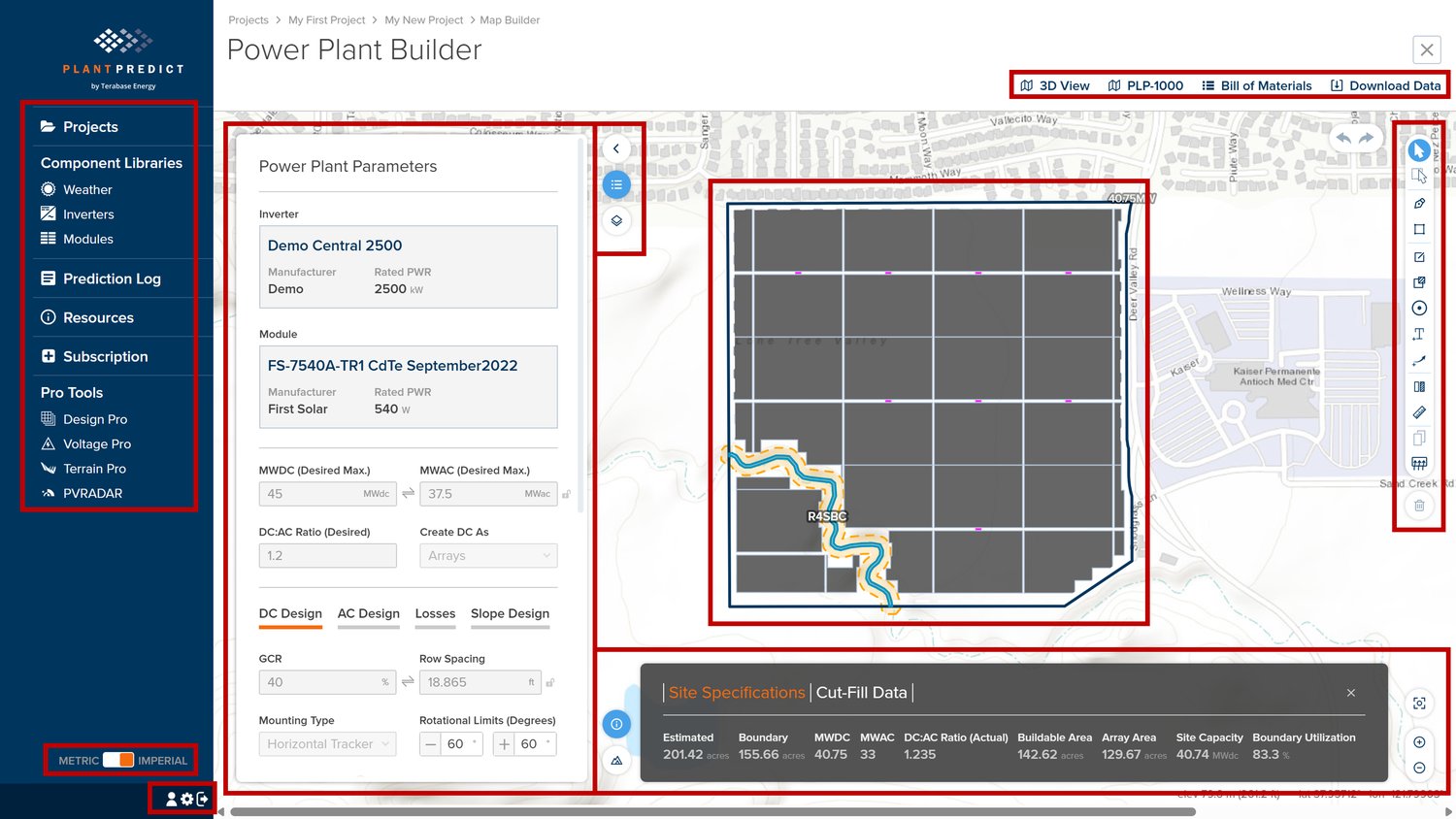
PlantPredict is a tool used to assess site constraints and energy yield for utility-scale solar projects. The interface features a generic options bar and input panel on the left side of the screen. The right side includes a toolbar with modification options. In the center, you will find a visual representation of the site layout and constraints generated from your inputs. The outputs from the simulation appear at the bottom of the screen, and you can download various results from the top right corner.
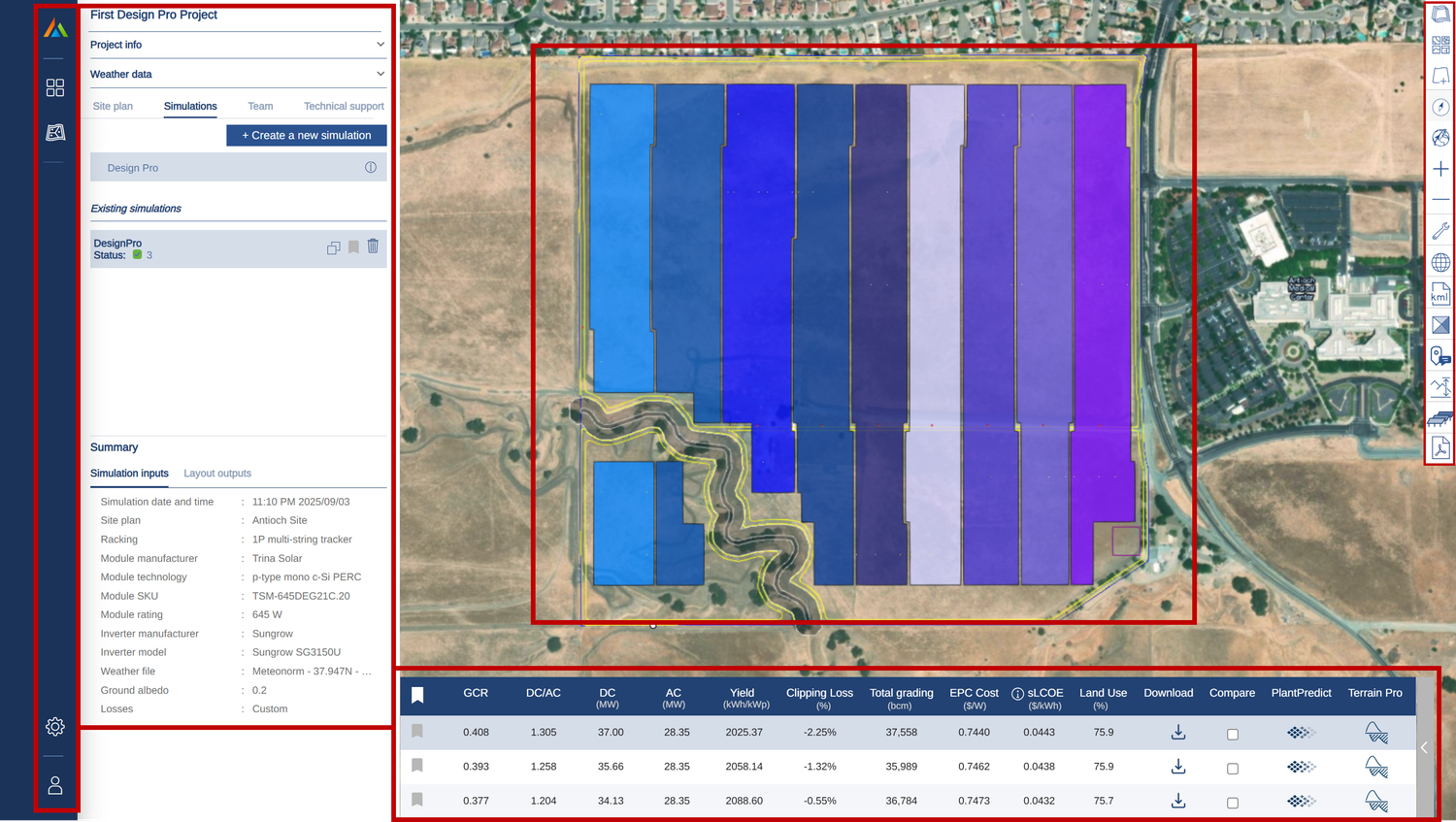
The Design Pro tool creates layouts for Utility-Scale Solar projects, along with estimates of energy production and financial costs. On the left side of the screen, you will find the input panel and the generic settings panel. The options and modification toolbar is located on the right side. In the center of the screen, a simulated layout is displayed, with the scenario results shown at the bottom.
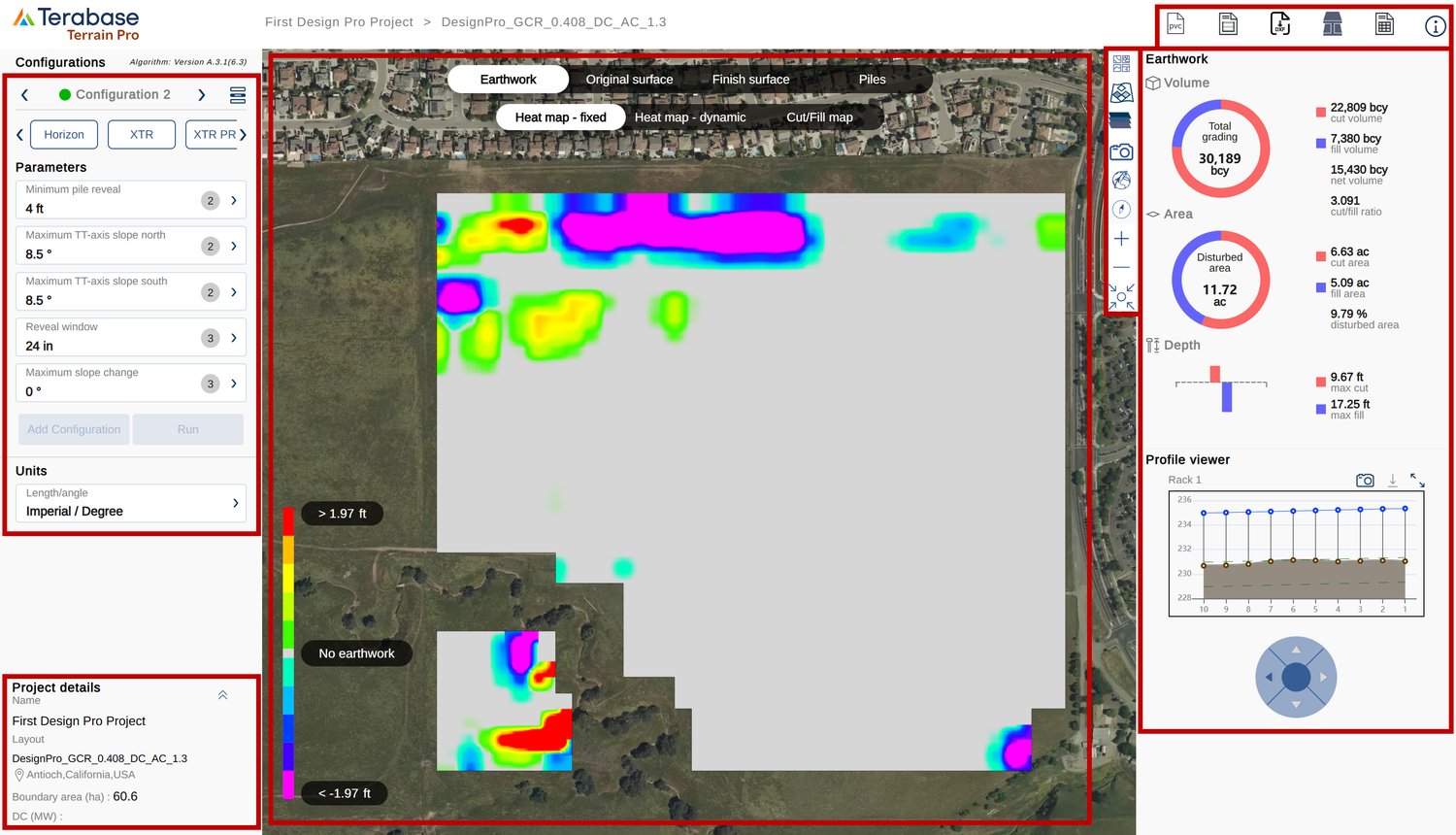
Terrain Pro is designed for calculating earthwork quantities for utility-scale solar projects. In the Input Panel at the top left, you can either select a tracker type or input parameters to run a simulation. Project details are displayed in the bottom left corner of the screen. In the example provided, the project layout is derived from a Design Pro simulation located in Antioch, California, covering an area of 60.6 hectares. The visual display in the center features an earthwork heatmap, which can also be switched to contour view or pile view. On the right side, you will find the results and the option to export them in various formats.
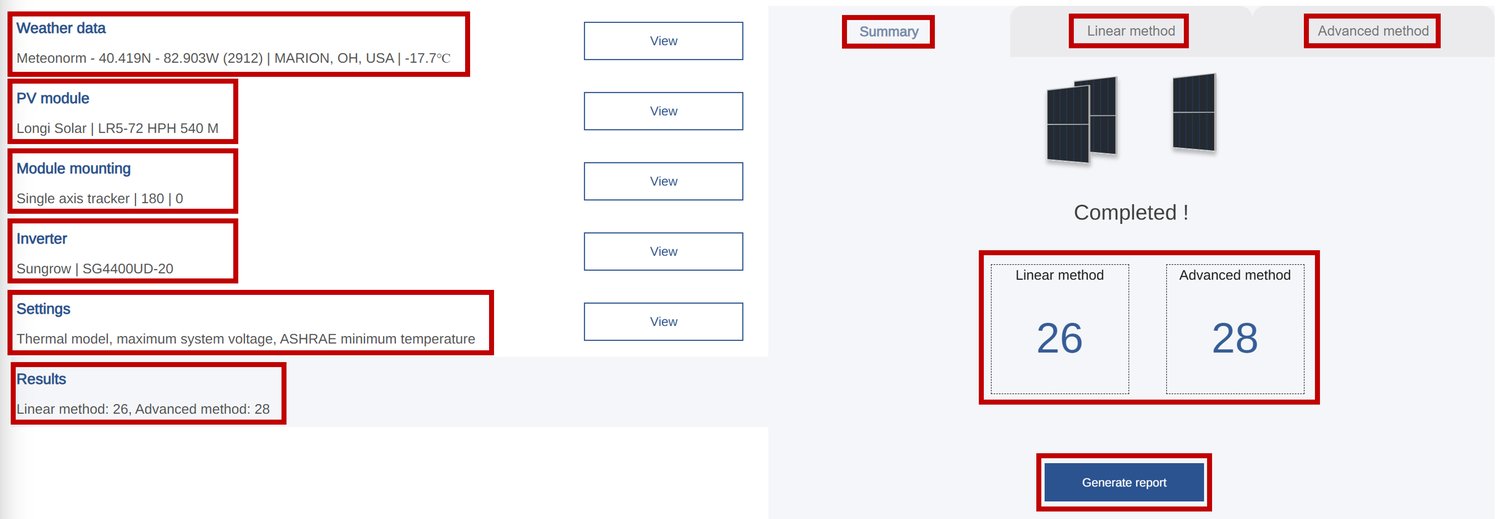
Voltage Pro is designed to optimize string size calculations. On the left side, you can click on various input parameters, including Weather Data, PV Module, Module Mounting, Inverter, and Settings, to view or update the inputs. The final option, Results, displays the string size calculation based on both the Linear and Advanced methods.

Legacy desktop software has served the industry for years, but it feels outdated. The software resides on local machines, collaboration means sending files via email, and updates require manual downloads.
In today's fast-paced solar development environment, that model is no longer sustainable. PlantPredict eliminates the headaches of these legacy desktop tools. Users can log in from anywhere and access the latest modules, weather datasets, and company project files.
In a world where cloud tools dominate and time is money, PlantPredict offers a more innovative, faster, and modern way to model solar energy projects. It's built for how today's teams actually work — collaboratively, remotely, and fast-paced — to deliver results quickly.
Cloud-based software is not just an alternative to the desktop-based software, it's a strategic upgrade for teams that value speed, accuracy, and collaboration.

Utility-scale solar projects rely on effective collaboration among various specialists and organizations, each responsible for a critical aspect of the project. When the right tools are not in place, miscommunication and version-control issues can significantly slow progress and lead to costly mistakes.
PlantPredict simplifies this process by offering a shared workspace where teams can collaborate securely and efficiently at every stage of the project.

Hiring experienced Solar Engineers is a challenge. The demand for solar talent is increasing rapidly, but there are very few professionals available with the necessary modeling expertise and software proficiency. Here are five ways PlantPredict can help you address this talent shortage.
1. Training Time Is Drastically Reduced
2. Junior Staff Can Contribute Faster and Independently
3. Senior Engineers Are Freed for High-Impact Work
4. Lower Dependency on Niche Software Expertise
5. Teams Become More Scalable and Resilient
With the right utility-scale solar modeling tool, such as PlantPredict, even a typical engineer or analyst can produce accurate and professional results.
In PlantPredict, each module is designed to simulate real-world performance and generate outputs that are bankable, audit-friendly, and presentation-ready.
Whether you're pitching to investors, submitting for permitting, or handing off to EPC teams, the software delivers clean, structured documentation that speaks the language of decision-makers.
Here's what you can expect from each tool:
PlantPredict Core Output
1. Site Specific Simulation Result

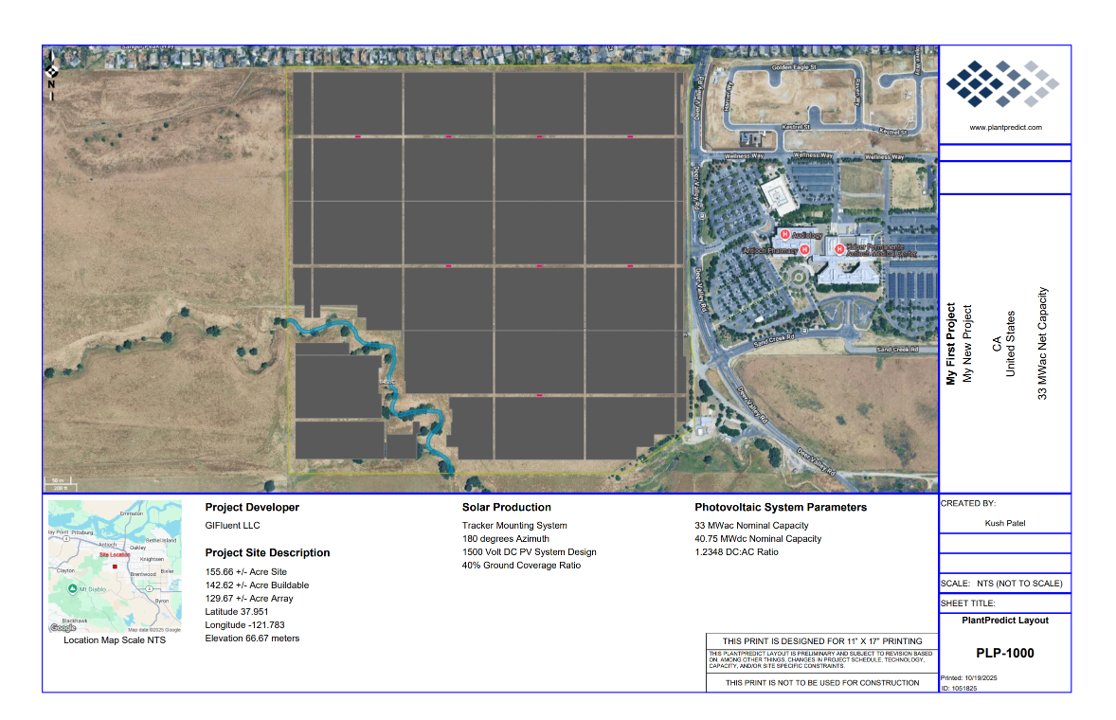
2. 11" x 17" Layout PDF (PLP-1000)
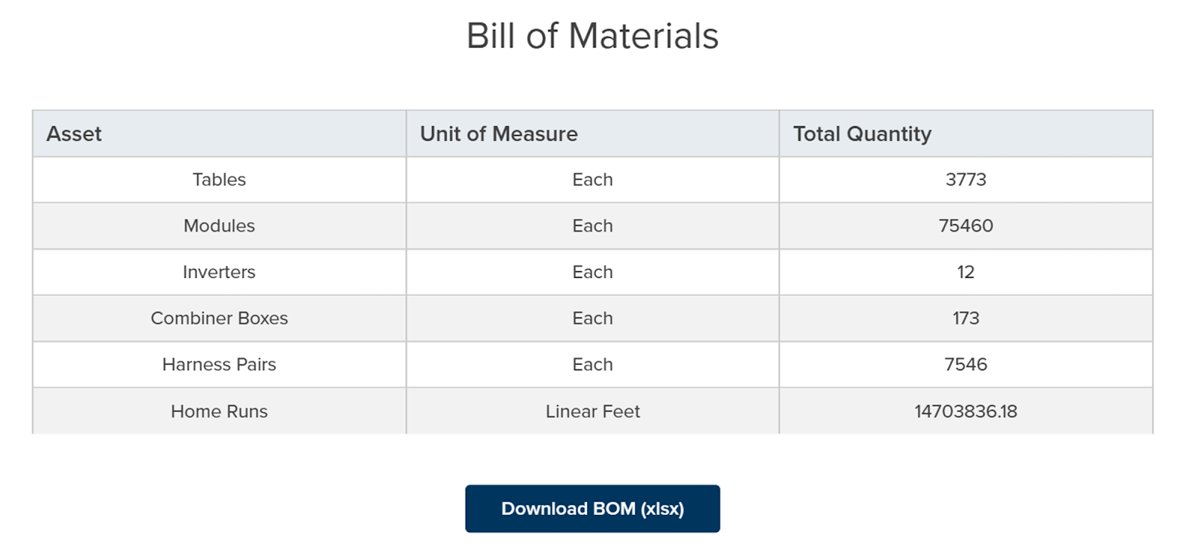
3. Bill of Materials (BOM)
4. Export Options

Design Pro Output
1. Site Specific Simulation Result

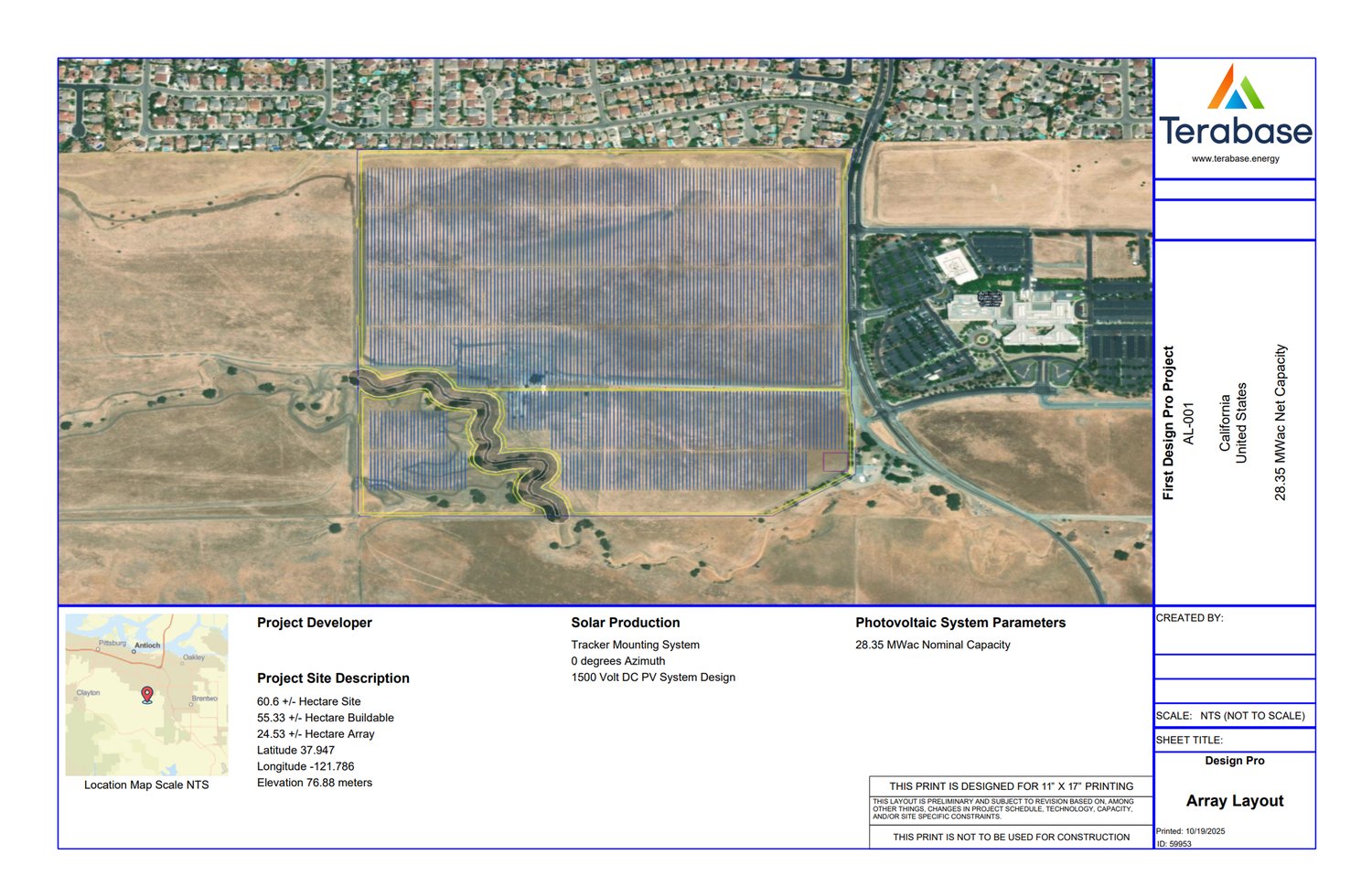
2. Array Layout - 11" x 17"
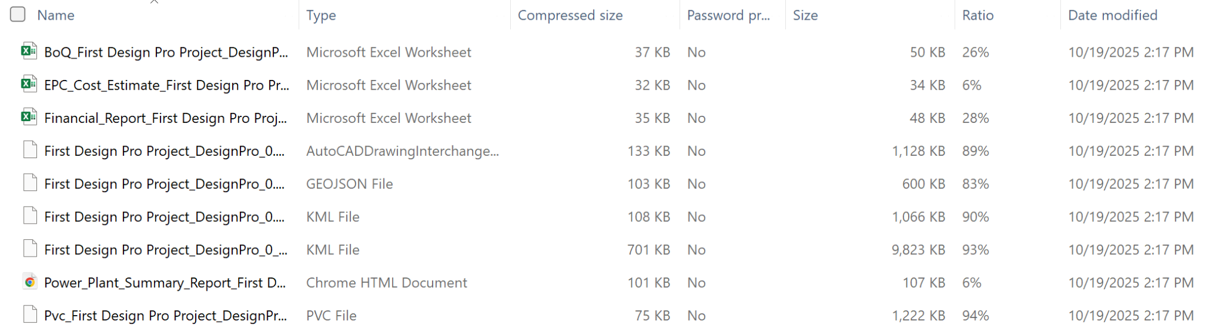
3. Financial Report and KML
Terrain Pro Core Output
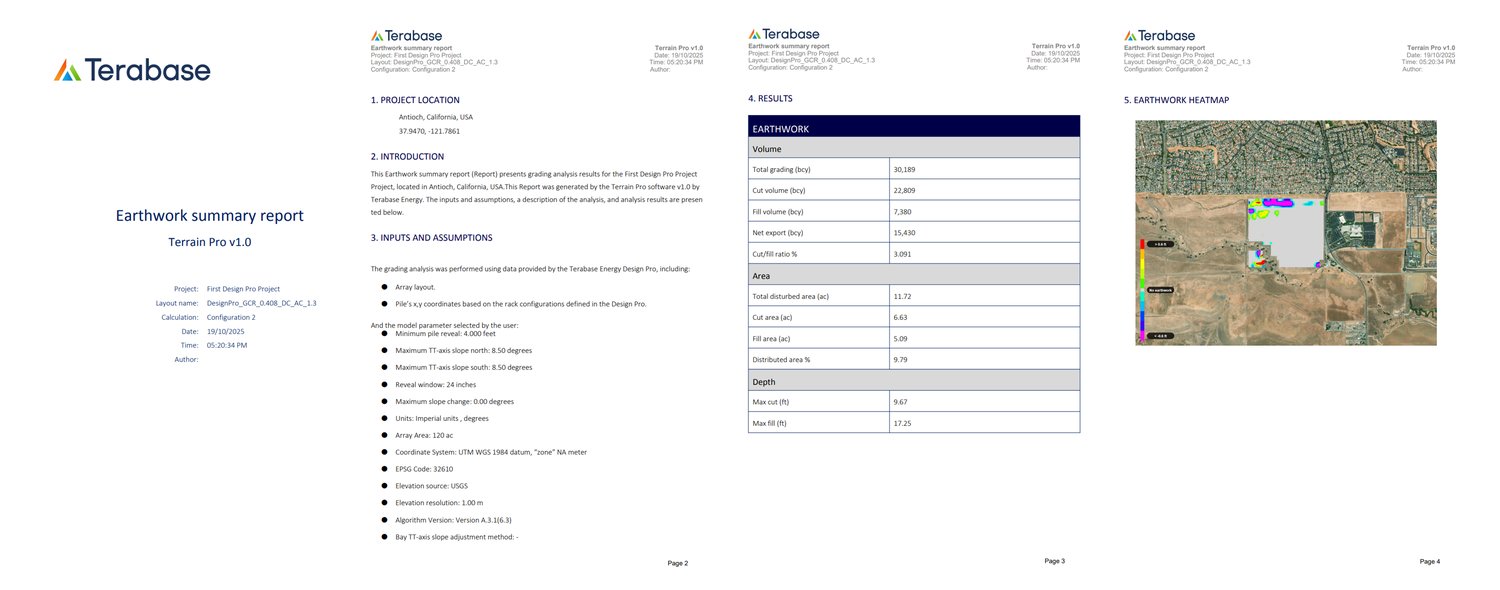
1. Earthwork Summary PDF
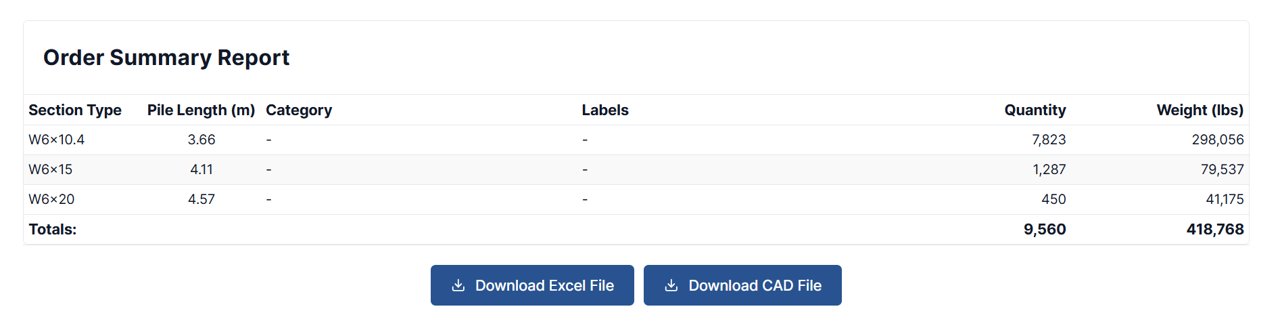
2. Pile Binning Configuration
3. Download PVC File, Rack Output Data, and DXF File

Voltage Pro Core Output
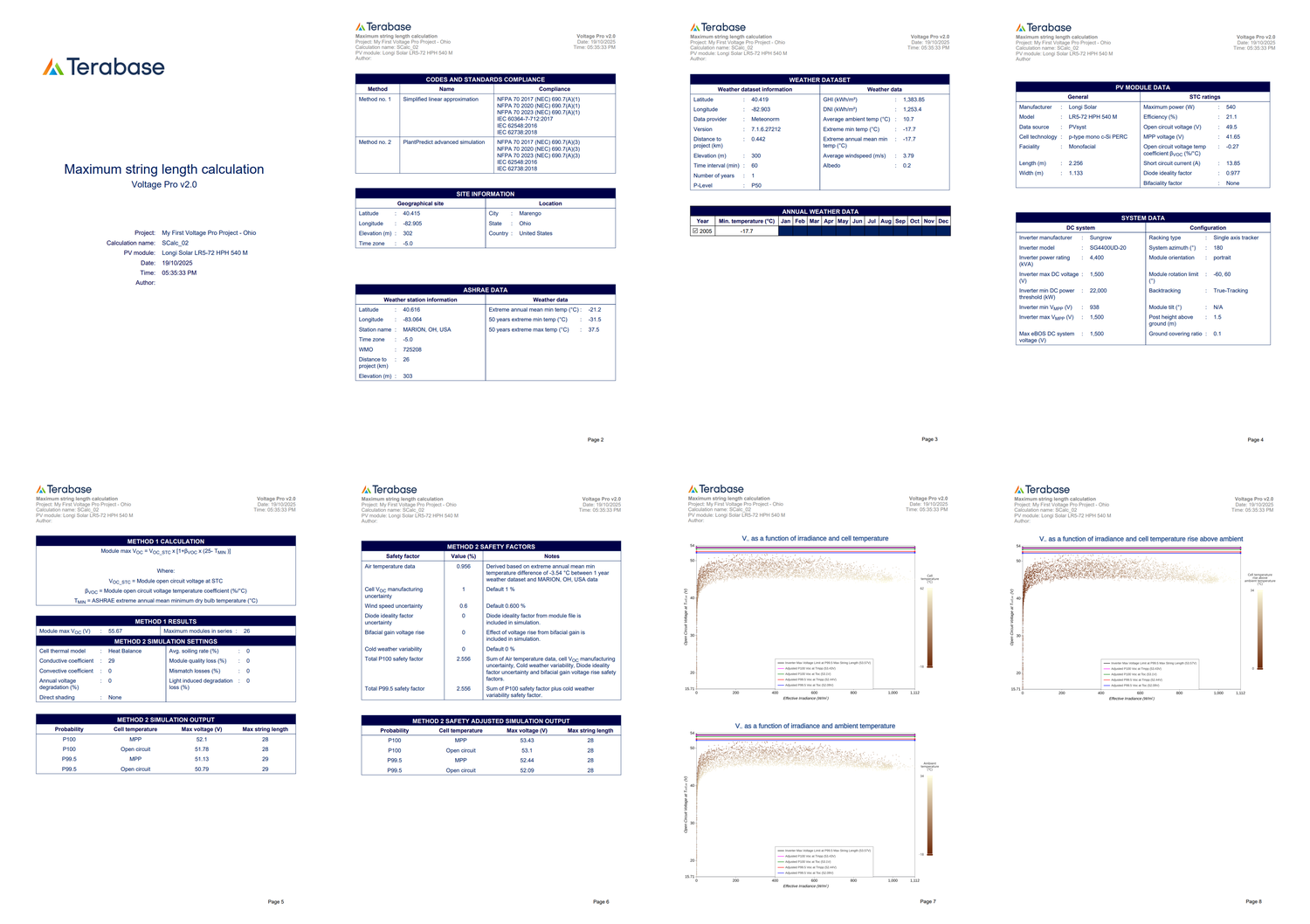
1. Maximum String Length Calculation Report
Why These Outputs Matter
1. Bankable & Audit-Friendly: Every report is structured for traceability — inputs, assumptions, and results are clearly documented.
2. Visually Clean & Exportable: No need for post-processing or manual formatting; PDFs are ready for boardrooms and regulatory filings.
3. Backed by Real-World Data: Weather files, terrain maps, and PAN/PPM specs ensure simulations reflect actual site conditions — not theoretical models.
As the solar industry continues to expand, the need for simplicity and accessibility are becoming just as crucial as precision. Tools that make workflows smoother, boost collaboration, and provide reliable insights allow teams to concentrate on what truly matters — ramping up clean energy production and doing it faster.
PlantPredict is a perfect example of this evolution. By combining user-friendly design, collaborative features, and dependable results, it enables solar professionals from all walks of life to work smarter, not harder — ultimately speeding up the growth of utility-scale solar around the globe.
Join hundreds of organizations that trust PlantPredict for bankable energy predictions. Start with a free account, get a free trial of Pro features, or book a demo with our team.